



If a Booth Level Officer (BLO) visits your home, don’t ignore the visit.
The Election Commission of India (ECI) has launched the House-to-House Enumeration phase of the Special Intensive Revision (SIR) 2026 of electoral rolls across Karnataka. The exercise will be conducted from June 30 to July 29, 2026, covering more than 5.54 crore electors across the state.
The objective of the Special Intensive Revision is to ensure that every eligible voter is included in the electoral roll while keeping the rolls accurate, complete and up to date.
Table of Contents
What is the Special Intensive Revision (SIR)?
SIR is a special voter verification exercise in which Booth Level Officers (BLOs) will visit every household in their assigned polling area to distribute Enumeration Forms to electors whose names appear in the electoral roll as on June 16, 2026.
Unlike regular voter registration or correction drives, no documents will be collected during this house-to-house enumeration phase.
Step-by-Step: What Every Voter Should Do
Step 1: Receive the Enumeration Form
A Booth Level Officer will visit your home and hand over an Enumeration Form if your name is already on the electoral roll as of June 16, 2026.
Step 2: Fill in the Details
Verify your personal details, complete the Enumeration Form carefully and sign it.
Where to find 2002 Voters Details
https://voters.eci.gov.in/searchInSIR/S2UA4DPDF-JK4QWODSE
Step 3: Submit the Form
Return the completed form to the BLO when they revisit your home. To ensure no voter is left out, BLOs will make up to three visits, wherever necessary, to collect the completed forms.
Step 4: Submit Online if You Prefer
From June 30, voters can also fill and submit the Enumeration Form online through:
– https://voters.eci.gov.in/
– ECINET mobile application

Many people are getting stuck while filling the SIR form because they cannot find their 2002 voter details. Here’s what you need to do:
Step 1: Search your name here:
ECI SIR 2026 – Search Your Name in Last SIR – https://voters.eci.gov.in/searchInSIR/S2UA4DPDF-JK4QWODSE
Important:
• In 2002, many Assembly Constituencies had different names, such as Belgaum, Bagewadi, and Uchgaon. Select the constituency that existed then.
• Enter your Elector Name.
• If you don’t get a result, try entering only your first name and the first 4–5 letters of your surname. Old voter lists often have spelling mistakes.
• Enter the captcha and click Search.
Still can’t find your name?
Go to the Karnataka CEO voter list:
Karnataka CEO Voter List Portal – https://ceo.karnataka.gov.in/voter_list/en
• Select the correct Assembly Constituency.
• Find your Part Number (this is your polling booth).
• Download the PDF voter list.
• Search the PDF manually for your name.
This usually helps when an online search returns no results.
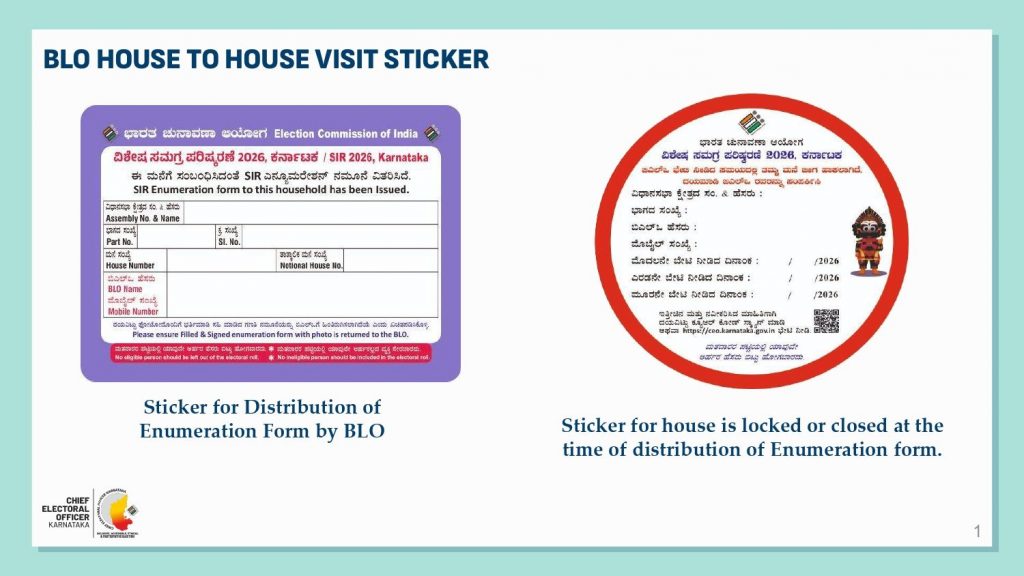
What Do the Stickers on Houses Mean?
During the survey, BLOs will paste coloured stickers on houses:
– ? Violet square sticker: The Enumeration Form has been delivered.
– ? Red round sticker: The house was found locked or closed during the BLO’s visit.
Important: Don’t Miss the Deadline
The Election Commission has made it clear that only electors who submit their duly completed Enumeration Form within the prescribed period will be included in the Draft Electoral Roll.
If the Enumeration Form is not received, the elector’s name will not be included in the Draft Electoral Roll.
All completed forms will be digitised by the Election Commission after collection.
What if You Have Just Become Eligible to Vote?
Citizens who have recently turned 18 or have otherwise become eligible to vote can apply for inclusion in the electoral roll by submitting Form 6 along with the prescribed declaration, as per the ECI’s instructions.
What if your name is NOT found in the 2002 voter list while filling the SIR form?
Many people have asked this question. Here is exactly what the current process says:
1. Check if a family member’s details can be used
In Part 2 of the SIR Enumeration Form, you can link yourself to a close relative whose name appeared in the 2002 Karnataka electoral roll.
This includes:
- Father
- Mother
- Spouse (if you moved to Belagavi after marriage)
- In-laws (tied to your spouse’s 2002 family records)
2. If no 2002 match is found
Do not panic. If your details or family linkages cannot be mapped to the 2002 roll, you will be marked as “Unmapped.” This does not mean your name is automatically deleted.
3. What happens next?
- Draft Roll Publication: The Draft Electoral Roll comes out on 5 August 2026.
- Official Notices: After this date, the Electoral Registration Officer (ERO) will issue official notices to unmapped voters.
- Opportunity to Prove Eligibility: This notice gives you a formal chance to establish your legal voting status.
4. Documents you will need later
Crucial Rule: Do not hand over any document photocopies to your Booth Level Officer (BLO) during the current house-to-house phase. No physical documents are collected right now.
Only after you receive the official post-August 5 ERO notice should you submit proof of your local residence, such as:
- Aadhaar Card
- Standard Address Proof (Electricity bill, bank passbook, etc.)
- Permanent Residence Certificate (Obtained online or offline)
- Any other document officially prescribed by the Election Commission
First-time voter
To register as a first-time voter during the ongoing Special Intensive Revision (SIR) 2026, you must submit Form 6 on the official Election Commission of India (ECI) Voter Service Portal. Since you have just turned 18, you are fully eligible to enroll as a new elector.
1. Register Online via ECI Portal –
- Visit the Portal: Open the official ECI Citizen Service Portal. – https://voters.eci.gov.in/
- Select Form 6: Click on New Voter Registration (Form 6).
- Create an Account: Sign up using your mobile number and email ID to log in.
- Fill in Details: Enter your state, district, assembly constituency, and exact personal details.
- Upload Documents: Submit a recent passport-sized photograph, age proof (like your Matriculation certificate or Birth Certificate), and current address proof.
- Submit the Form: Review your entries and click submit to generate a reference tracking ID.
2. Register via the Mobile App
- Download the App: Install the official Voter Helpline App or ECINET from the Google Play Store or Apple App Store.
- Navigate to Forms: Open the app menu and select Voter Registration Forms.
- Complete Form 6: Fill out your digital Form 6, upload necessary documents directly from your phone camera, and submit.
3. Register Offline via Your Local BLO
- Wait for a Visit: As part of the active door-to-door SIR enumeration phase, a Booth Level Officer (BLO) will visit your house.
- Request Form 6: Ask the visiting BLO for a physical copy of Form 6 for fresh registration.
- Submit Locally: Fill out the form, attach self-attested photocopies of your age and residence proof, and hand it back to the officer.
The Bottom Line
Not finding your 2002 details today is not the end of the process. The Election Commission has built a dedicated verification stage after the draft roll specifically to protect and validate your voting rights.
Important Dates
– June 30, 2026: House-to-house enumeration begins and online submission of Enumeration Forms starts.
– July 29, 2026: House-to-house enumeration and collection of forms conclude.
– October 7, 2026: Final Electoral Roll to be published.
The Election Commission describes the Special Intensive Revision as a participative, transparent and citizen-centric exercise. Voters are advised to cooperate with Booth Level Officers and submit their Enumeration Forms within the stipulated period to ensure their names are included in the Draft Electoral Roll and subsequently in the final electoral roll.
used website worked., but it’s not updating- and has perfect- data. on one page it’s showing all mobile, email, name, family relation ok, but on other page it says mobile not linked to voter id EPIC, email not linked, filling form 8 to link mobile not opening and so on. the form- to be filled with BLO- i could not get that..
could have MARATHI VERSION of your above info by help of copilot ms-ai page
Very well explained, precisely and concisely! Thank you.
What is to be done if name is not on the electoral roll as of June 16, 2026, but appears in 2002 roll.?
If your name is not on the current electoral roll but appears in the 2002 roll, you must use your 2002 registration details to complete self-mapping through the ongoing Special Intensive Revision (SIR) 2026 drive. This ensures your name is successfully restored and transitioned to the upcoming draft electoral roll.